Hi Monect team,
First of all — thanks for the app, I've been using it for a long time and the overall functionality is great. I'd like to suggest three improvements that would make daily use significantly better, especially in landscape mode.
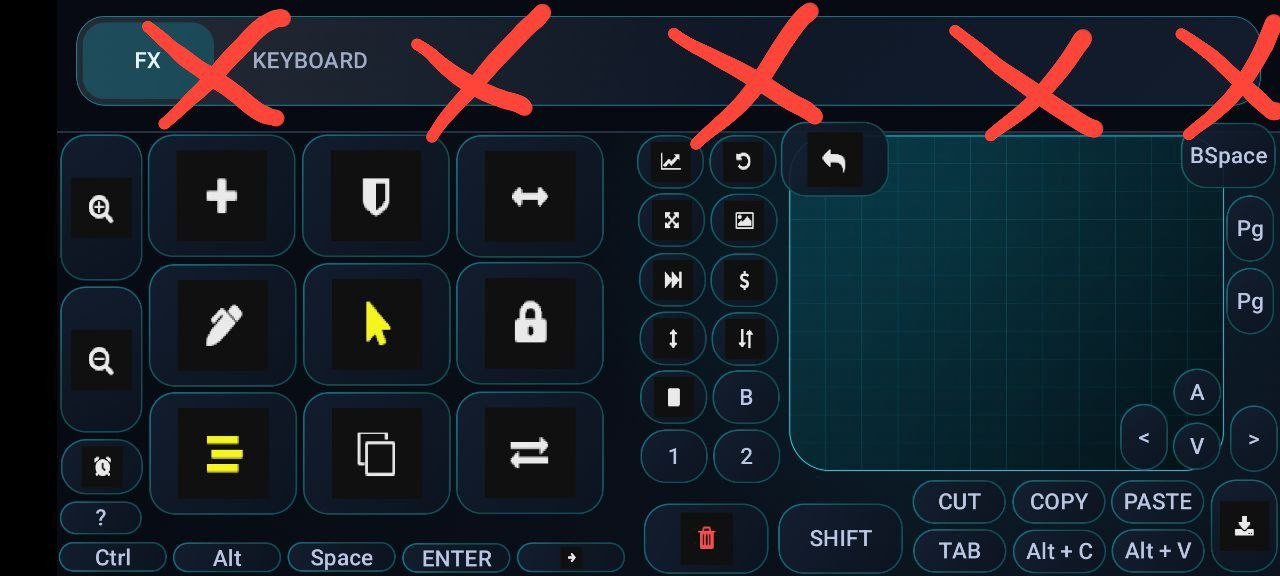
1. Layer switcher panel takes too much space in landscape
The layer-switching tab bar at the top consumes a huge amount of screen real estate in landscape mode. Please consider letting users hide it and switch layers another way. Two possible implementations:
- Via Script — add a new script command that switches the active layout by name. Example:
switchLayout(MyKeyboard). This would let users assign layer switching to any custom button.
- A dedicated button action — add an action type "Switch to layout" where the user just picks the target layout from a dropdown of existing layouts.
Either option (or both) would free up a lot of vertical space and give users full control over their layout.
2. Scroll-bar toggle for in-layout Touchpad
The full-screen Touchpad already has a scroll-bar toggle — please add the same toggle to the Touchpad element used inside custom layouts. Right now the in-layout touchpad is missing this option.
3. Minimum cursor speed slider for Touchpad
The current sensitivity slider works well for acceleration, but when moving the finger very slowly, the cursor barely moves at all — making precise pointing unpredictable.
Please add a second slider for minimum cursor speed. This would set a floor for cursor movement and make slow precise movements much more predictable.
Thanks for considering these. They would make Monect significantly more usable for productivity scenarios (not just gaming).
Best regards